Heya :D
I decided to keep seperate posts, in case I wanna post new stuff :D
also, I figured I haven't fully explained the game yet :D
here's where it's at yo, haha, you get pinguins in your iglos.
when you have enough pinuins to take over a hostile or neutral iglo, Go ahead!
that's basically it.
it's a remake of nanowars, which can be found here: http://www.kongregate.com/games/badben/nano-war-2?acomplete=nano
however, I'm looking for a name, so if there are an idea's post them in the comments down below please :D
here's an update screeeeen:
woensdag 10 augustus 2011
maandag 8 augustus 2011
Pengu Update 1
and so, with the other problems off the course.
It finally begins, like this:
And update! So it continues!
Interesting, I might decide to keep updating this one post as this will be what I'll be working on for the coming weeks!
And update! So it continues!
Interesting, I might decide to keep updating this one post as this will be what I'll be working on for the coming weeks!
donderdag 23 juni 2011
Aqualibrium
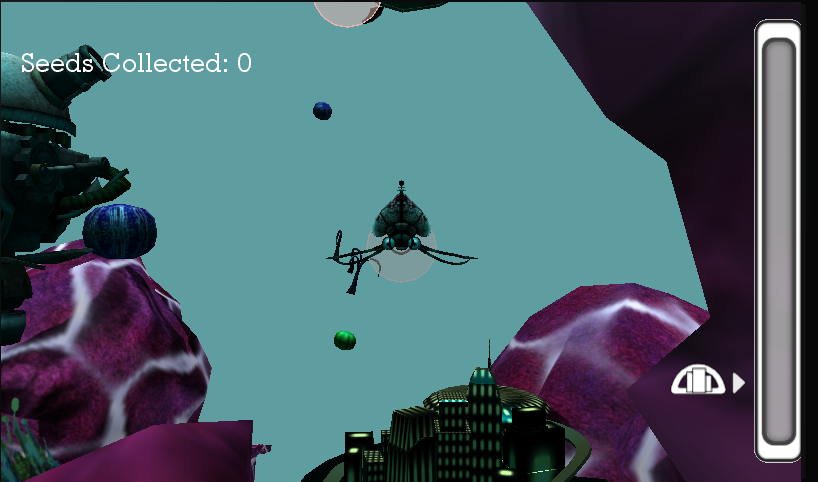
Finally finished my exam entry for integration, a windows phone 7 game.
The game itself will go into heavy post production however during the summer.
Here's a trailer, dutch version however. I'll update with the english version in a little bit.
The game itself will go into heavy post production however during the summer.
Here's a trailer, dutch version however. I'll update with the english version in a little bit.
donderdag 16 juni 2011
W00t ! 3D for games Exam!
Here's.. basically what i've been working on this semester!
First of all, we had to recreate london in 2111. (in UDK)
After a flood and what not!
Here's a screen, more to come!
Next up, Myself.. In 3D :D
Hurrah :D
There we go!
(As usual, Click to enlarge!)
Drop a line if you like it :D
Jack, Signing out!
woensdag 8 juni 2011
Glowgo
Owkaay, so it's not really a post,
but it's a shoutout for someone who is really special in my life!
she's working on an awesome safety project to create self illuminating jackets, as opposed to standard fluorescent materials.
here's her world changer! http://www.facebook.com/glowgoforkids go check it out and like it!
they need your support!
cheers!
but it's a shoutout for someone who is really special in my life!
she's working on an awesome safety project to create self illuminating jackets, as opposed to standard fluorescent materials.
here's her world changer! http://www.facebook.com/glowgoforkids go check it out and like it!
they need your support!
cheers!
zaterdag 7 mei 2011
XNA Minitut!
In order to make a dual texture effect in XNA, but retain the functionalities of the basic effect (in case you can't write your own shaders, E.g. on the phone), I figured out a workaround.
here's a piece of code, I'll explain it afterwards
Spritebatch.Begin();
graphics.GraphicsDevice.SetRenderTarget(null);
FinalRenderTex = ProcessTexTarget as Texture2D;
I've gone ahead and colourcoded it for clarity.
first we make the necessary textures and a rendertarget, that is the Blue section of code.
here's a piece of code, I'll explain it afterwards
private Texture2D BaseTexture, SecondTexture, FinalRenderTex, ;
private RenderTarget2D ProcessTexTarget;
graphics.GraphicsDevice.SetRenderTarget(ProcessTexTarget);
Spritebatch.Begin();
Spritebatch.Draw(BaseTexture, new Rectangle(0, 0, 1024, 1024), new Rectangle(0, 0, 1024, 1024), Color.White);
Spritebatch.Draw(SecondTexture, new Rectangle(0, 0, 1024, 1024), Rect, Color.White);
Spritebatch.End();graphics.GraphicsDevice.SetRenderTarget(null);
FinalRenderTex = ProcessTexTarget as Texture2D;
I've gone ahead and colourcoded it for clarity.
first we make the necessary textures and a rendertarget, that is the Blue section of code.
BaseTexture and SecondTexture are the ones we will be mixing, FinalRenderTex will be the Texture we will write to.
ProcessTexTarget, finally, is the render target we will use to do that.
usually, the rendertarget used is the backbuffer, which is then drawn onto the screen though the XNA content pipeline.
In the Yellow line, rendertargets really get interesting. There, we change the render target drawn to.
The Red block of code, the XNA spritebatch is used to draw Images onto the screen, like a 2D game, nothing special.
The second texture however is a transparent texture, and in my case I used a custom rect that is constantly redefined in the update function, that way, I'm able tho scroll through a spritesheet and animate stuff like caustics and so forth
In the Green and final block of code, the backbuffer is restored by setting the render target back to null and the the rendertarget is written to the texture. the order of the statements is important because you can't write rendertarget to a texture while it's still enabled as the active target.
Finally, here's a final result, the way I used it!
It's not great, and it still needs a lot of work, but i'll upadte it lators. haha :D
cheers!
donderdag 5 mei 2011
Stepping it up!
we got our self assignment for 3D!
we will be lowpoly modeling, texturing and rigging ourselves!
it's gonna be fun!
also, on the topic of XNA, I'll be doing a mini tutorial on how to archieve a DualTexture effect with rendertargets, so you can still plug it into a basic effect and use multiple lights and stuff. but that's just incase you can't use shaders! (like on the windows phone..)
anywhoo,
here's what I got so far for 3D!
click to enlarge, ofc.
we will be lowpoly modeling, texturing and rigging ourselves!
it's gonna be fun!
also, on the topic of XNA, I'll be doing a mini tutorial on how to archieve a DualTexture effect with rendertargets, so you can still plug it into a basic effect and use multiple lights and stuff. but that's just incase you can't use shaders! (like on the windows phone..)
anywhoo,
here's what I got so far for 3D!
click to enlarge, ofc.
Abonneren op:
Posts (Atom)